← printmd

printmd updates

New features and improvements in printmd, by date: syntax highlighting and code themes, and a document info card that shows the front matter of prompt files such as meta prompts and skill files.

  1. Syntax highlighting, code themes, and a front matter card for prompt files

    Code blocks and YAML front matter got a big upgrade, so code and prompt documents read and print better. Prompt files that start with metadata such as name and description — meta prompts, skill files (SKILL.md) and the like — now show that metadata as a tidy document info card, and save to PDF just as they look. If you keep your prompts in Markdown, this makes a prompt library easy to turn into a readable document.
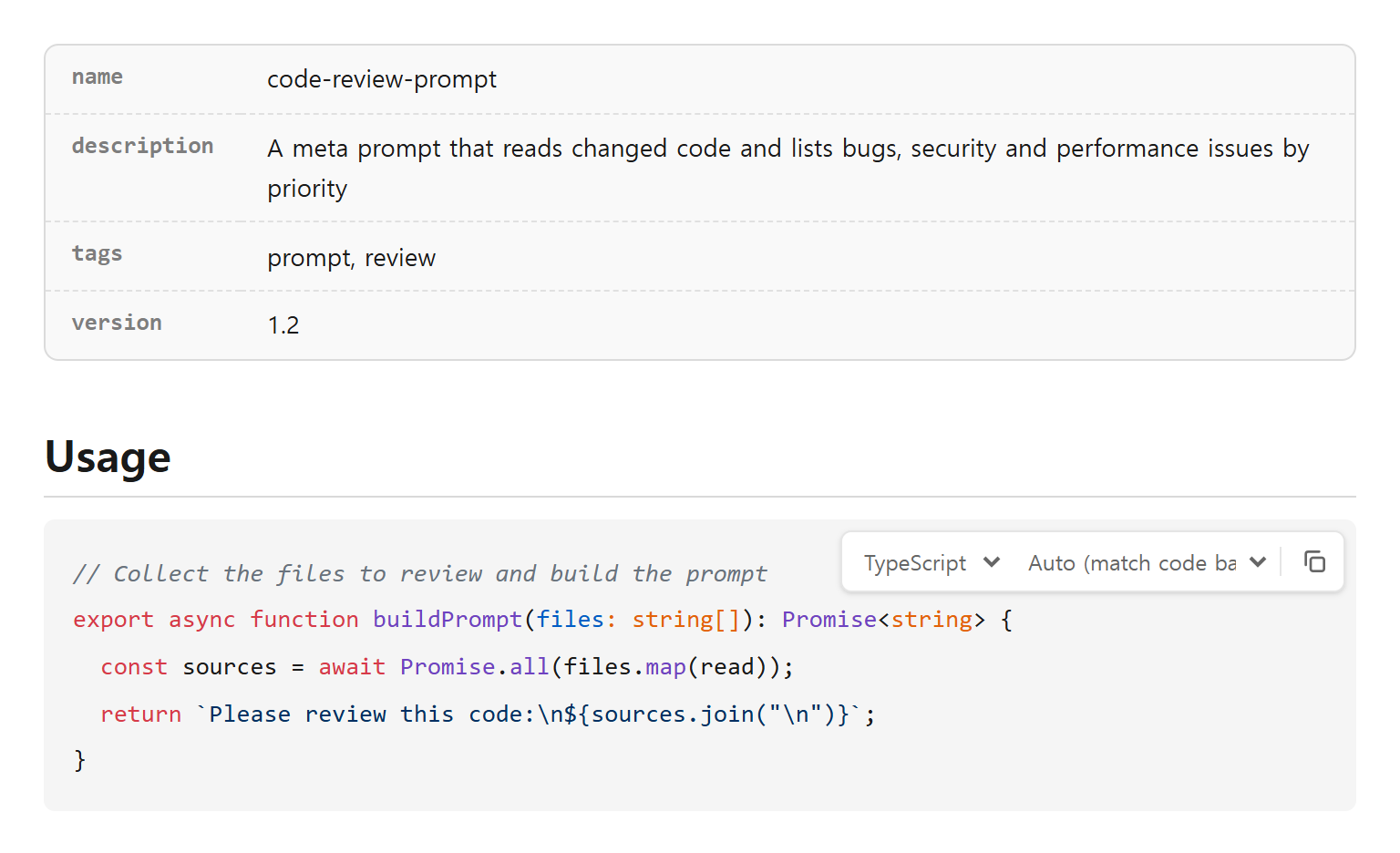
    Preview of a meta prompt file: its front matter shown as a name, description, tags and version card, and a TypeScript code block with syntax highlighting and the language, theme and copy toolbar
    Front matter becomes a document info card and code is coloured for its language. Hover a code block to bring up its toolbar.
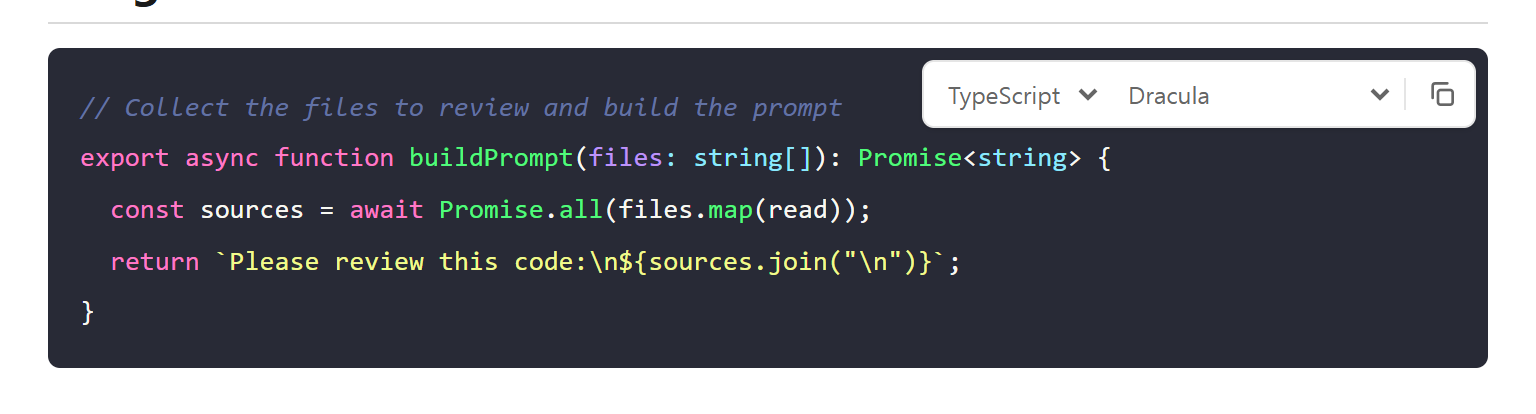
    TypeScript code in the Dracula theme, chosen from the code block toolbar
    Pick a theme from the toolbar and it applies at once. (Dracula)
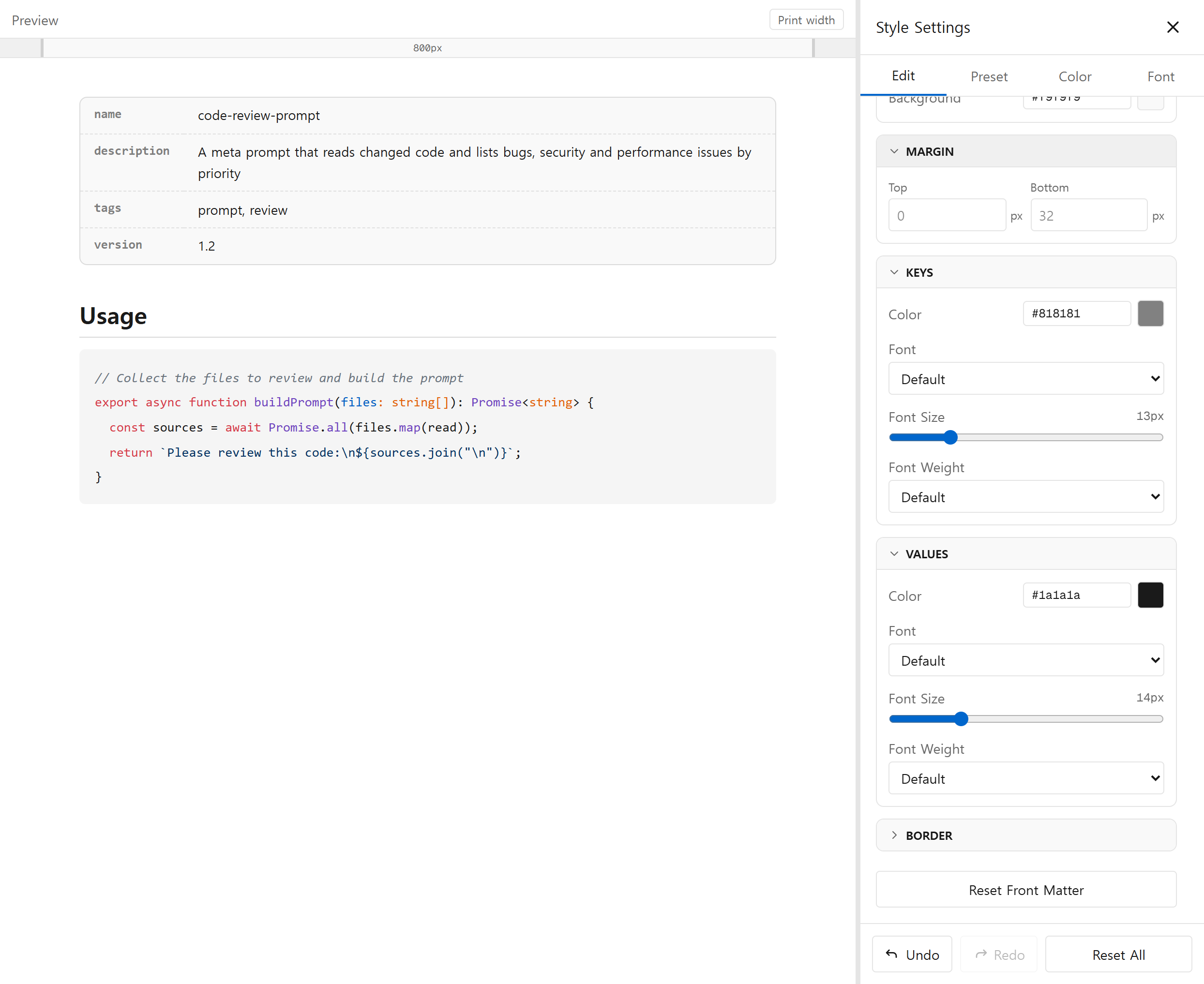
    The style panel with Front Matter selected: Keys and Values are separate cards, each with colour, font, size and weight
    Style keys and values separately in the style panel, where each group of settings is its own card.

    New

    • Syntax highlighting: write a language after the fence (```ts) and the code is coloured for it. 24 languages including TypeScript, Python, Go, Rust, Kotlin, Swift, C/C++, C#, PHP, Ruby and SQL.
    • Code themes: choose GitHub, One, Monokai, Dracula, Nord or Solarized — the same in the preview, print and PDF. The default (Auto) picks light or dark colours to suit the code background.
    • Code block toolbar: hover a code block in the preview to change its language or theme and copy the code. Changing the language updates the Markdown source too.
    • Document info card: YAML front matter at the top of a file (the block between --- lines) is shown as a key/value card — handy for meta prompts, skill files and blog post metadata.
    • Document info styling: in the style panel, set colour, font, size and weight separately for keys and values, plus the card's background, margin and border.

    Improved

    • Code blocks and inline code are now styled separately. Styles you saved earlier carry over unchanged.
    • Style panel groups are now separate cards, so it's clear which fields belong together. Colour fields show the default colour that is actually on screen.
    • Opening the style panel hides the right-hand ad column, giving the preview more room.

    Fixed

    • Fixed code block margin and border being drawn on every line.
    • Fixed front matter turning into one giant heading because of its closing ---.
    • Fixed element reset leaving front matter key/value and table header/cell styles behind, and the element buttons shifting when one was selected.
  2. Preview width ruler, sidebar reordering and a feedback button

    Resize the preview straight from a ruler and check line wrapping at the printed width. In the document sidebar you can drag to reorder, and send feedback by email in one click.

    New

    • Preview width ruler: drag either end of the ruler above the preview to resize it. Double-click for full width; arrow keys move it 50px at a time.
    • Print width button: matches the preview to the page body width, so lines wrap where they will when printed.
    • Drag documents and folders in the sidebar to reorder them; unsaved documents show a dot.
    • Send feedback: email us straight from the sidebar, with the environment details we need for bug reports filled in.

    Improved

    • The style panel's maximum width now goes up to 2400px.
  3. Open Hangul (HWP/HWPX) files, and paste with formatting kept

    Open Hangul documents right in the browser and turn them into Markdown. Copy from a web page or a ChatGPT, Claude or Gemini answer and paste — headings, lists, tables and code blocks come through as Markdown.

    New

    • Opening an HWPX or older HWP (5.0) file converts it to Markdown inside your browser. The file never leaves your computer.
    • Paste with formatting: pasting a web page or AI answer keeps its structure as Markdown. Code becomes fenced blocks with their language, and math is restored to its LaTeX source.
    • Added guide pages for the HWP viewer, HWP to Markdown, and saving ChatGPT answers as PDF.

    Fixed

    • Fixed the Chrome extension failing to open npm, PyPI, Notion and issue pages.
  4. Editor polish: drafts that survive refresh, tab names, dark mode

    Lots of small fixes for everyday writing. Drafts now survive a refresh, and the home page is the editor alone, with no scrolling.

    New

    • New draft tabs are named after the document's first heading.
    • An empty editor shows a hint, and the editor's buttons and menus follow the page language (Korean/English).

    Improved

    • The home page is now just the editor, and the document sidebar links to the other tools and guides.
    • Header buttons are ordered by how often they're used, with consistent icons.

    Fixed

    • Fixed unsaved drafts disappearing on refresh.
    • Fixed hard-to-read Markdown highlighting in the editor in dark mode, and print header/footer fields too narrow to show their values.
    • Fixed an empty strip left where an ad didn't load, and the sidebar toggle covering the toolbar.
  5. PDFs with real, selectable text

    PDFs are now made with the browser's own printing instead of a picture of the screen. Text in the PDF can be selected, copied and searched, stays sharp when zoomed, and keeps Korean and uploaded fonts.

    New

    • PDFs now contain real text — selectable, copyable, searchable, and smaller.

    Improved

    • Print and Save PDF are now one button; pick a printer or "Save as PDF" in the browser's print dialog.
    • The preview and the PDF now share one stylesheet, so what you see is what prints.

    Fixed

    • Fixed uploaded fonts missing from printouts, and element layout breaking when printing without backgrounds.
  6. Print and PDF now match

    Printing and saving as PDF now produce the same result, and text in PDFs sits where it should.

    Improved

    • Print now uses the same output as Save PDF, so both match. Backgrounds are included in PDFs by default.
    • Tab indents by 4 spaces in the editor, matching nested lists in the preview.

    Fixed

    • Fixed table and checklist text sitting too low in PDFs, and extra space above the first element.
  7. Better PDF output, and clickable checkboxes in the preview

    A round of PDF and print fixes: theme presets carry into the output, and Korean headers/footers and page breaks come out clean. You can also tick checkboxes right in the preview.

    New

    • Click a checkbox in the preview to toggle [ ] / [x] in the Markdown. [ ] and [x] outside lists also render as checkboxes.
    • PDFs are saved as 'title-date.pdf'.

    Fixed

    • Fixed theme preset styles not applying to PDF downloads and printing.
    • Fixed garbled Korean in PDF headers/footers and table headers or headings stranded at page breaks, and made PDFs much smaller.
    • Fixed the print preview window's UI being printed along with the document, and the drag-and-drop overlay staying up after leaving the window.
  8. 15 presets, slide mode, and share links for styles and documents

    Theme presets grow to 15, with fine control over tables, headings, images and code blocks. Show a document split by --- as slides, and share a style or a whole document with one link.

    New

    • 10 new theme presets — Sepia, Ocean, Forest, Sunset, Newspaper, Academic, Notebook, Terminal, Elegant and Pastel — each with its own heading, bold and table colours.
    • Slide mode: present a document split by --- one slide at a time, using the keyboard to move.
    • Share links: share your current style as a link, or a whole document as a compressed link.
    • More to style: heading underlines, images, code blocks and tables (header, cells, striped rows) in the style panel.
    • Added an interactive Markdown cheatsheet page.
    • The Chrome extension now supports GitLab, Bitbucket, npm, PyPI and Notion, in Korean and English.

    Improved

    • A new colour picker with colour roles and your own colours one click away, and style panel text in a single language.
    • On mobile the style panel opens full screen and the save/load dialogs fit the screen. The offline screen is clearer too.
  9. Per-element style editor, custom presets, document sidebar and tabs

    Style each element in detail and save the result as your own preset. Organise documents in folders in the new left sidebar, and keep several open in tabs.

    New

    • Per-element style editor: set font, size, colour and spacing for headings, paragraphs, lists, quotes and more, with the spacing highlighted in the preview as you edit.
    • Custom presets: save, load and delete your styles, and export or import them as JSON. Style changes support undo and redo.
    • Upload your own fonts, pick palettes by colour role in the Color tab, and browse the new preset gallery page.
    • Document sidebar: see saved documents as a folder tree, and rename, drag to move, or create folders.
    • Tabs: open several documents in tabs and switch between them like any editor.
    • Task lists (- [ ] / - [x]) render as checkboxes.

    Improved

    • Style settings moved from a dialog into a side panel, so you can edit while watching the preview.

    Fixed

    • Fixed the page font and uploaded fonts being lost after a refresh.
  10. Mobile layout, Korean formatting and PDF fixes, a better Chrome extension

    The layout now works on phones, and common formatting and PDF problems with Korean text are fixed. The Chrome extension can also open Gists and issue/PR descriptions.

    New

    • Chrome extension: open GitHub Gists and issue/PR descriptions in printmd, with a keyboard shortcut (Ctrl+Shift+P) and clearing of recent files.
    • Added the blog and about pages.

    Improved

    • Documents you're writing are saved in your browser automatically.

    Fixed

    • Fixed **bold** and *italic* not working right next to Korean (CJK) characters.
    • Fixed blank pages in downloaded PDFs, and the editor and preview scrolling as one.
    • Fixed the broken mobile layout, and missing list bullets and code block backgrounds in the preview.
  11. Save documents in folders, and a multi-page print preview

    Save your documents into folders and open them again later. The print preview now splits pages just like real paper.

    New

    • Save and open documents, organised in folders in your browser.
    • The print preview shows multiple pages at real paper size.

    Improved

    • README badge images line up side by side in the preview.

    Fixed

    • Fixed the Chrome extension not finding the README on a repository's main page.
  12. printmd launches

    printmd is out: a free web tool to write Markdown, style it the way you like, and save it as a PDF — no sign-up, no install.

    New

    • A Markdown editor with live preview, theme presets, print preview and PDF download.
    • Drag and drop Markdown files to open them; save and download.
    • A Chrome extension that opens GitHub READMEs and Markdown files in printmd.
    • Korean and English.

Try the new features now.

Open the editor